Feature Gantt
See the real date while there is time to change it.
Team standard · SciPlay
A tool I built at SciPlay. It turns a Jira feature into a schedule producers can run a sprint against, and it shows where work is starting to stall. It was adopted as the production team’s standard planning tool after a demo to studio leadership.
At a glance
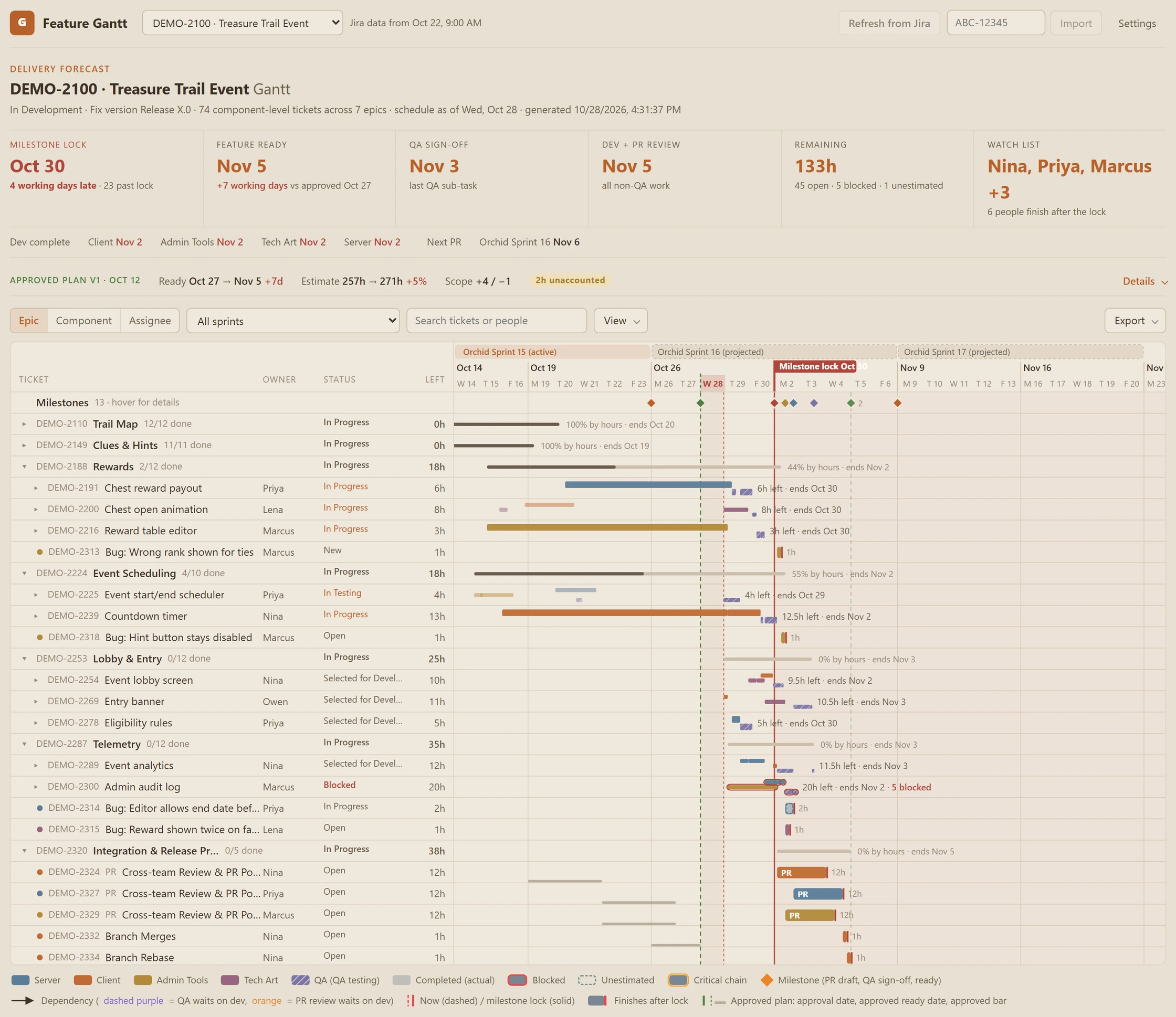
The planning problem
A feature date built from total hours and total capacity looks safe until the week it slips. It assumes anyone can pick up any ticket and that nothing waits on anything else.
Stalls tended to surface late, in standup or at the milestone, and the sprint kickoff email was put together by hand every sprint. I wanted one view that answers the questions producers get asked: when will it be ready, what changed since we approved the plan, and where is work starting to stall.
How it works
Schedule against the people doing the work.
Each ticket goes on the calendar of the person assigned to it, at that person’s capacity, in the order the team agreed to work.
- Jira feature Read-only
- Schedule each person Capacity and sprint order
- Sequence the work Dependencies and QA timing
- Approve the plan Producer sign-off
- Track the drift Dates, hours, and scope
One person, one queue.
Each person works one ticket at a time at their own daily capacity. Spare capacity in one discipline does not shorten another discipline’s queue.
Sprint order, then board rank.
Carried-over work goes first, then the current sprint, then future sprints. Within each group, Jira board rank decides.
QA waits on development.
Testing starts after the work it tests, and PR review waits for its component’s development. The critical chain shows which work sets the ready date.
What a producer sees
Where work is stalling, before the milestone.
The schedule flags what needs a conversation while there is still time to act on it.
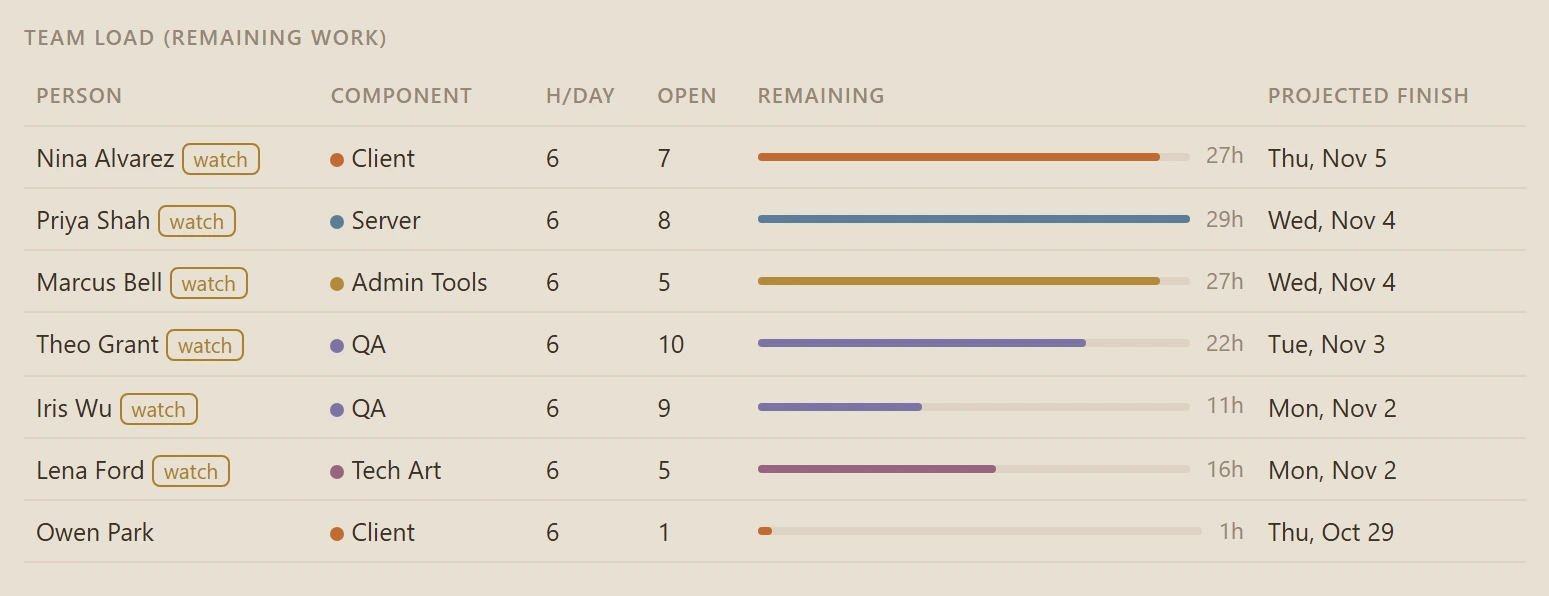
- Watch ListPeople projected to finish after the milestone lock.
- Blocked workFlagged rather than delayed, because Jira has no unblock date. A blocker on the critical chain puts the sprint at risk.
- Unestimated ticketsDrawn dashed at a default size so they stay visible.
- Sprint conflicts and gapsWork planned for an earlier sprint than something it depends on, and open work with no sprint.
- Drift from the approved planReady date, estimate, and scope changes since approval.
Stakeholder outputs
Three outputs, one set of dates.
All three are built from the scheduler’s dates. The kickoff email brings together every tracked feature with work in the sprint.
Approved plan record
Saved when a producer approves the plan: ready date, QA sign-off, hours by discipline, and margin to the milestone lock. Later reports measure against it.
Sprint status report
A red, amber, or green status with the reasons written out, a burndown, what changed since approval, and the producer’s mitigation plan.
Sprint kickoff email
Sprint goals, a goal for each ticket, and a day-by-day calendar of who is working on what across all the features it tracks. Built because the manual version took too long each sprint.
Design choices
The tool informs. Producers decide.
Read-only toward Jira
The tool never creates, edits, or comments on tickets. Jira stays the system of record.
Dates come from rules
Fixed rules in code set every date, so the same data always gives the same schedule. Claude refreshes the Jira data on request, but the rules set the dates.
Producers make the calls
Producers approve the plan, override a status with a stated reason, write the mitigation plan, and set sprint goals.
A burndown that does not flatter
When an open ticket has used up its estimate and Jira shows no hours left, the tool assumes some work remains and keeps it on the burndown, next to Jira’s own line. The chart does not show work as done before it is.
Technical approach
A single-page web tool, built with Claude over about a week. The scheduler is resource-leveled and dependency-aware: per-person capacity, finish-to-start dependencies, sprint-first ordering, and a critical chain traced back from the last open ticket. Approved plans are kept as versions. The schedule exports to PNG, PDF, or an interactive HTML snapshot. Implementation details remain with my employer.
Make the date easy to trust.
Let’s talk about delivery planning, release risk, and team leadership.